Run outbound with more control, intelligence and visibility.
Outbound execution for SDR teams. Build the whole prospect journey on a visual canvas, see exactly how much email is going out and when, and hand every reply to a person.
Early access. Orvik Flow is in early access. The Flow Builder, send forecasting, prospects, inbox and writing assistance shown here are the real product; sending through connected mailboxes launches with the Flow production service. Starting a Flow or Suite trial, or buying one, registers your early-access request — we'll email you when your workspace can send.
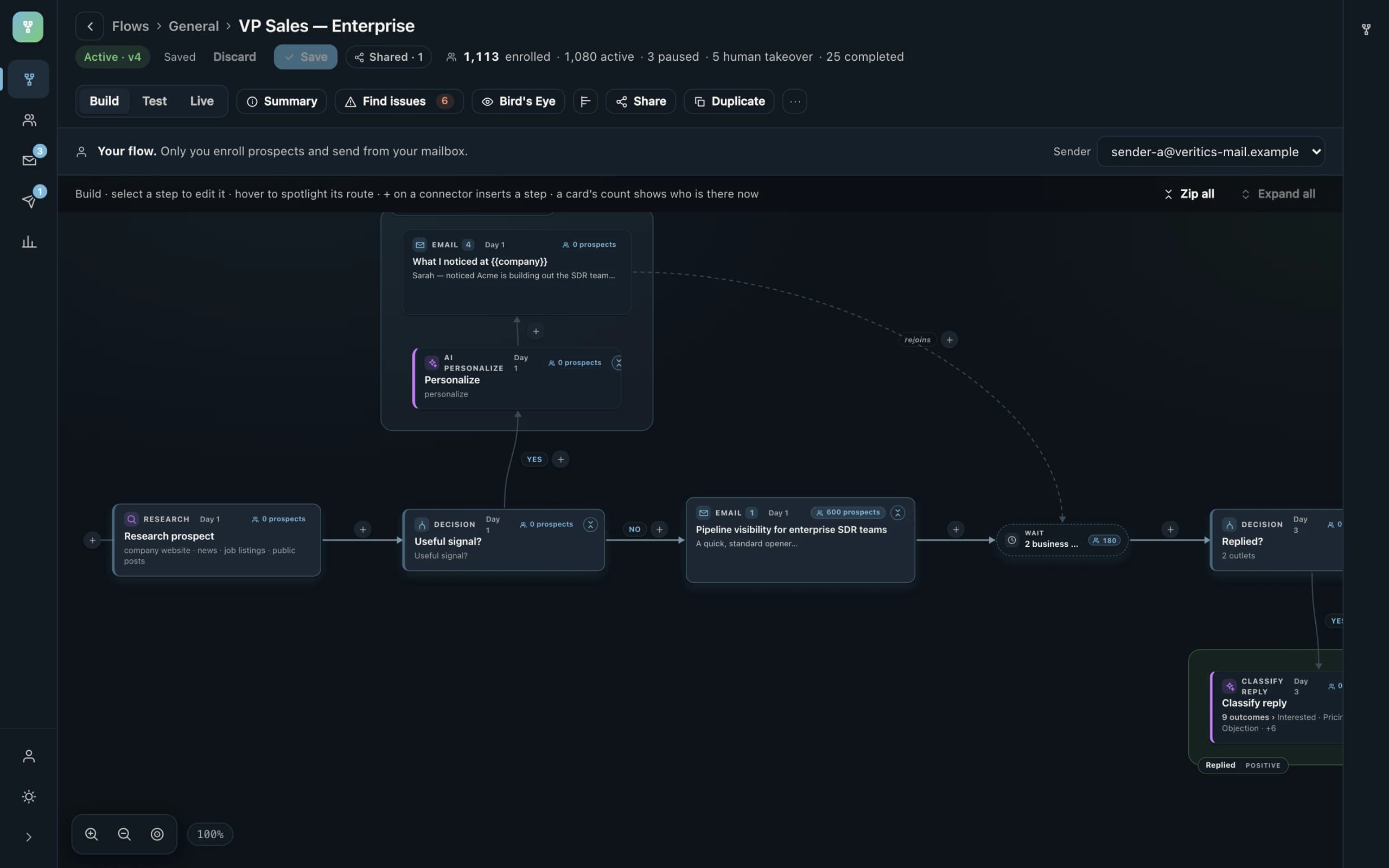
The whole journey, on one canvas.
Select a step to edit it, hover to spotlight its route, insert on any connector. Every card shows how many prospects are there right now. Test, Live and Find issues keep a flow honest before it runs.
- Email 1Quick thought about your SDR team
- Wait2 business days
- DecisionReplied?
- no → the automated path continues
- DecisionLinkedIn viable + capacity
- LinkedIn InMailSaw your post on pipeline quality
- Wait3 days
- Email 2Following up — SDR pipeline visibility
Steps that mean something
Research, decision, email (with A/B variants), wait, LinkedIn InMail, classify reply, review, handoff, tag, subflow and outcome. Placeholders are limited to what the product will actually fill in.
Waits and branches
A wait owns its timing and its allowed send days; a target that lands on a disallowed weekday rolls forward. Decisions fan out on real conditions such as a signal, a reply, or LinkedIn viability.
Reusable handlers
Out-of-office, Not now, Referral and Objection handlers are subflows shared through the team library, so the same good response lives in one place.
See tomorrow's email before it goes out.
Every flow sends from one of the owner's mailboxes and every mailbox has a daily cap. The capacity calendar derives the coming week from the real execution state — enrollments, positions, waits and caps — so capacity planning is a forecast, not a hope.
- Hard sends (confirmed and guaranteed) are placed against mailbox, domain and organization caps; projected sends are pressure, never a reservation.
- Overloaded days show what rolled and why; underfilled days show room; weekends and non-send days are shown as No sending.
- Rollover risk is named: which flow, which step, which mailbox or domain bound it, and where the sends landed instead.
- An emergency pause stops all outbound email without touching flows, timing or pending demand.
Hard sends never exceed a mailbox's configured capacity; what does not fit is placed on the next eligible day, and the calendar says so in advance. The trial's own limits are lower and are listed under the Flow trial rules.
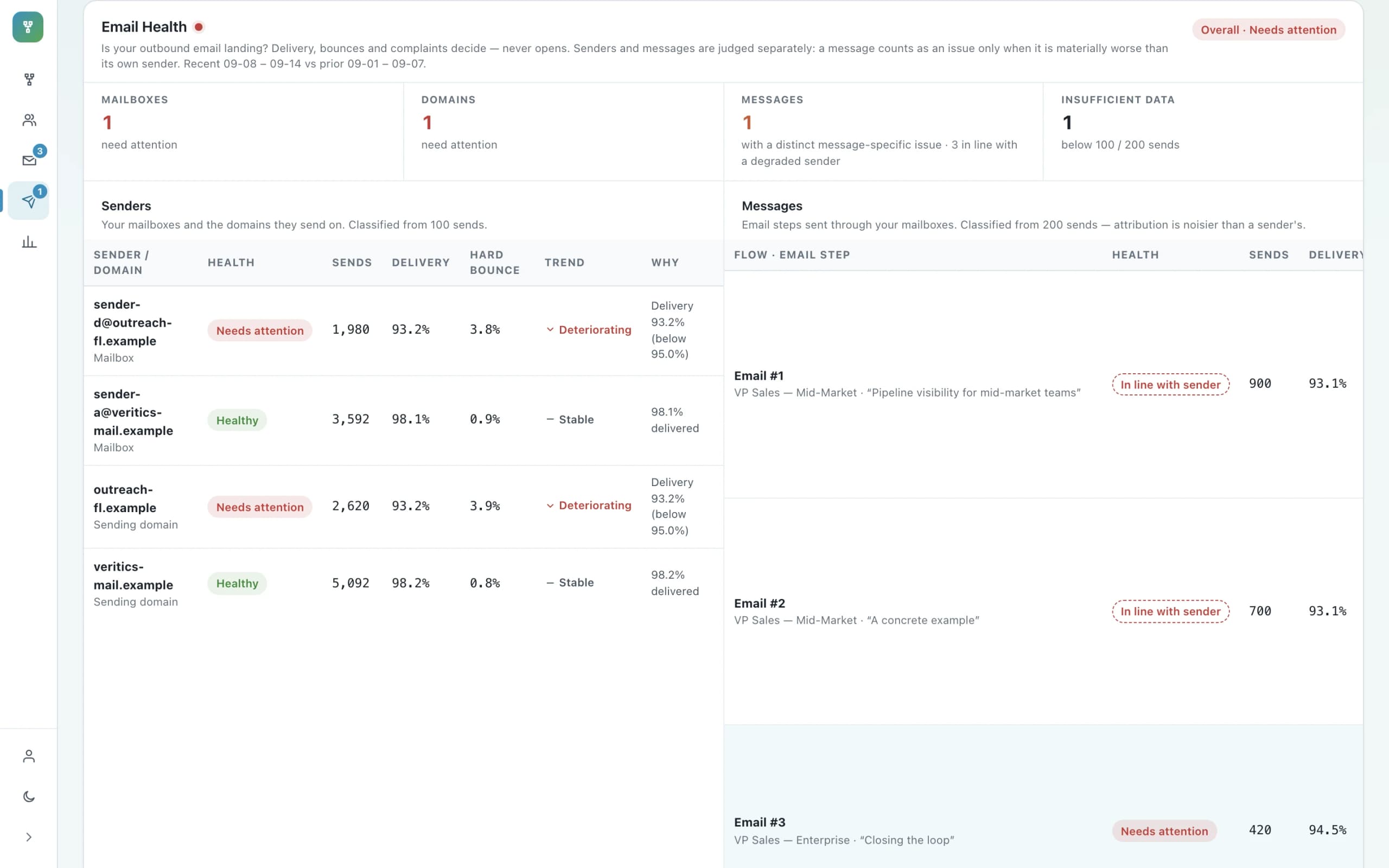
Deliverability lives in Email Health, not in open rates.
Is your outbound email landing? Flow answers with delivery, bounce and complaint rates for each sender and each message, with a trend and a reason, so the fix is a decision rather than a guess.
- Mailboxes, domains and messages are judged separately on delivery, bounces and complaints — never on opens.
- A message counts as an issue only when it is materially worse than its own sender.
- Domain caps are shared by every mailbox on the domain — earned and spent together.
The current Flow build derives Email Health from a provider-neutral telemetry contract; real mailbox and domain providers populate the same counts as they are connected.
Every prospect's story, in order.
Prospects are people, not rows in a sequence. Flow keeps the complete activity history for each one, and moving a prospect to another flow keeps every old message exactly as it was sent.
- Which flow and which step each prospect is in, with collisions flagged when two flows want the same person.
- Bulk enrollment with a review table before anything is enrolled; recent imports kept as batches.
- A chronological history across email and LinkedIn, and the flow attribution on every automated message — never rewritten.
- Personalized email sent Sep 14 · 9:14 AMSubject “Noticed SDR hiring at Acme” · mailbox sender-a · flow v4 step Personalized email
- Open signal Sep 14 · 10:03 AMWeak signal — not treated as intent
- No reply after 2 business days Sep 16 · 9:00 AMAssessed LinkedIn: viability High · 12 credits · automatic
- InMail sent Sep 16 · 9:01 AM“Sent you a note by email too…”
- InMail reply Sep 18 · 11:00 AM“Thanks — happy to chat next week.” · human takeover · email cadence suppressed
A reply is a person's job.
Automation earns its place by getting a person into the conversation at the right moment. Flow never replies on a prospect's behalf: it classifies, routes and hands off.
- Replied? branches stop the automated path for that prospect and route the conversation to classification or a human.
- Reply classification sorts into outcomes — Interested, Pricing, Objection, Not now, Out of office, Referral — with per-step confidence thresholds; uncertain cases go to manual review.
- Unsubscribed and bounced are outcomes in their own right, so a flow ends cleanly instead of continuing blindly.
- The Inbox shows conversations across your sending mailboxes with the flow context beside each thread.
- ClassifyReply → Interested
- AI · requires approvalDraft response
- ReviewApprove response
- OutcomeMeeting booked
Uncertain classifications go to manual review. Nothing here replies on the prospect's behalf.
Every mailbox you send from, in one inbox.
Flow's Inbox reads like the mail client you already know — Inbox, Starred, Snoozed, labels, search — but it is one place for every sending mailbox on your account, and every thread carries the flow that started it.
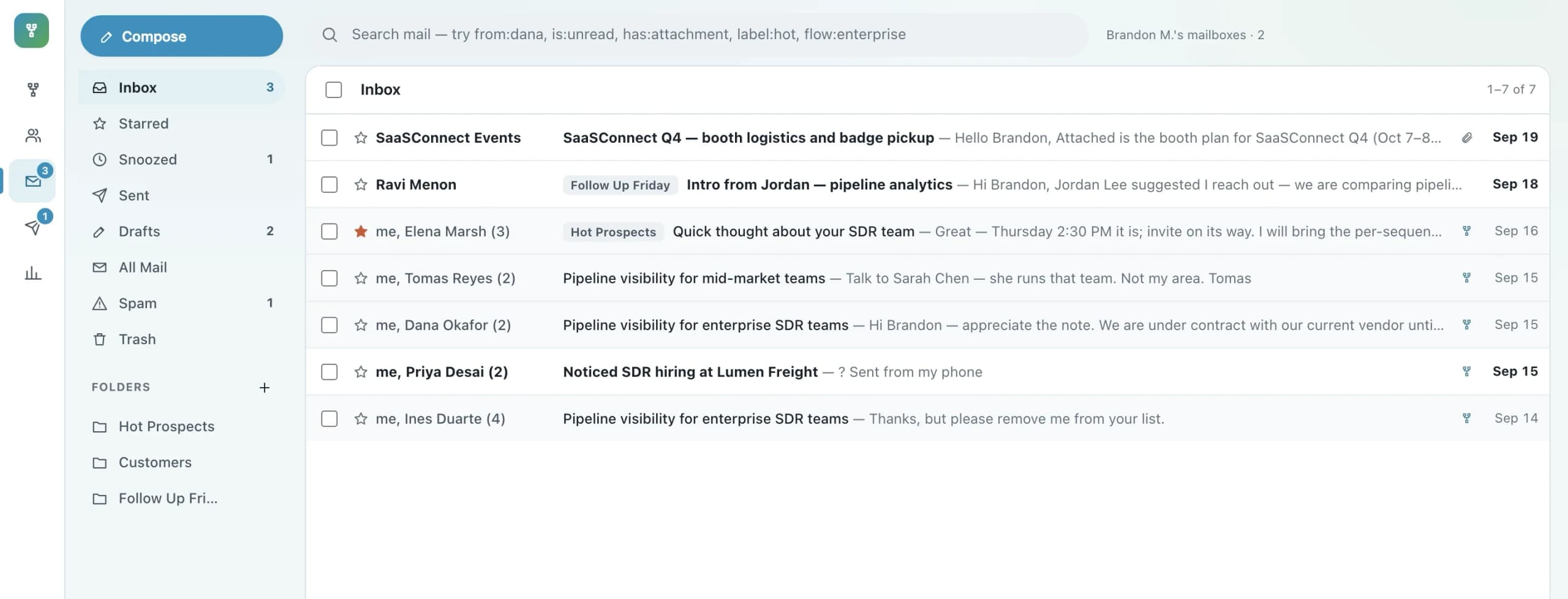
One list, every mailbox
Replies to all of your sending mailboxes land in one inbox. Each thread keeps the mailbox it lives on, so nothing is merged, renamed or lost — it is simply in one place.
Search the way you already do
from:dana, is:unread, has:attachment, label:hot — plus flow:enterprise and prospect:marcus, because this inbox knows the outbound behind each conversation.
The flow, beside the thread
Every automated email keeps the flow and step that sent it, exactly as sent — even after a prospect moves to another flow. A prospect's reply shows its classification next to the conversation.
The Inbox shown here runs on the sample mailboxes. Gmail / Google Workspace, Microsoft 365 and IMAP mailboxes connect through the Flow production service, which is what early access is waiting on.
Three ways to write. One person who decides.
Writing assistance in the Flow Builder, in a new message and in a reply, built as one capability with one security boundary.
- Manual, Orvik AI, or Your AI — a provider you connect that receives exactly the same bounded context and nothing more.
- Direct, Friendly, Personal, Concise, Rewrite or Try again — transformations of the current text, not a replacement for judgement.
- Personal leads with what is actually known about the recipient — never invented — and every draft lands in your ordinary editor.
The writing assistant sees the writing context and your text: not the workspace, not other users' data, and not other prospects.
Orvik AI. Orvik's assistant drafts or transforms over the bounded writing context, and the draft lands in your ordinary editor.
Personal. Leads with what is actually known about the recipient — never invented.
- The writing context
- Your current text
- The workspace
- The flow document
- Enrollments
- Other users' data
- Orvik's own prompts
The Flow trial rules.
Fixed product rules, enforced by the Flow service — the website only explains them.
- 14 calendar days — which contain 10 weekday sending days, not 14.
- Trial sending runs Monday through Friday. Saturday and Sunday sending is blocked.
- Up to 3 connected sending email accounts.
- A maximum of 100 outbound emails per connected account per eligible weekday.
- A maximum of 3,000 trial sends in total (3 accounts × 100 emails × 10 weekdays).
- Your configured caps still apply — the trial can only lower what is effective, never raise it.
14 calendar days contain 10 sending days. Saturday and Sunday are blocked for trial sending.
Straight answers about Flow.
$69 / user / month. Start free, or purchase now.
Is Flow an email sequencer?
Email is one step type. A flow is the whole prospect journey: research, decisions, emails with A/B variants, waits with allowed send days, a LinkedIn InMail fallback, reply classification, handler subflows, review, handoff and outcomes — on one canvas, with the send forecast and capacity for all of it.
What does Flow do on LinkedIn?
Flow can route a prospect to a LinkedIn InMail step as a fallback channel when a viability check supports it. No connection request is ever required or sent, and a reply is always a human handoff. Flow does not automate connection requests or manage LinkedIn conversations.
What happens when a prospect replies?
A reply is a handoff to a person. Flows branch on Replied?, classify the reply into outcomes such as Interested, Pricing, Objection, Not now, Out of office or Referral, send uncertain classifications to manual review, and route to handler subflows or a human takeover — never an automated back-and-forth.
How does the free trial limit sending?
14 calendar days of access with sending Monday to Friday only, up to 3 connected sending accounts, 100 outbound emails per account per eligible weekday, and 3,000 trial sends in total. The trial lowers what is effective; it never raises a cap you configured.
Does Flow write my emails for me?
Only when you ask. Every email, new message and reply has three modes: Manual, Orvik AI, or Your AI (a provider you connect). The assistant transforms the current text — Direct, Friendly, Personal, Concise, or Try again — and is bounded to what is actually known about the recipient. Nothing goes out without a person choosing to send it.
Start with Flow.
$69 / user / month. Try it free for 14 days, buy it outright, take the guided demo, or talk it through with Orvik.